
Is YubiKey Safe? Security Review, Real Risks & How It Compares to Other 2FA Methods
Quick Answer: Yes, YubiKey is safe – it’s the most phishing-resistant authentication method available to consumers, using FIDO2 public-key cryptography to block account takeovers that defeat SMS and authenticator app-based 2FA. Get the YubiKey 5C NFC on batten.shop for $58.
Passwords fail. That’s not a theory anymore – it’s a pattern. Every year, billions of credentials leak in data breaches, and phishing attacks grow more convincing. The attackers aren’t just guessing passwords. They’re intercepting SMS codes, cloning authenticator app sessions, and running adversary-in-the-middle attacks that capture your two-factor authentication token the second you type it in.
Software-based 2FA was a meaningful upgrade over passwords alone. But it has a ceiling. Hardware security keys like the YubiKey exist because that ceiling became a problem. They operate on a different security model entirely – one where the cryptographic secret never leaves the device, and phishing is architecturally impossible, not just unlikely.
The question isn’t whether YubiKey is safer than nothing. It obviously is. The real questions are: how secure is it, what are the actual risks, and is it the right fit for you?
Table of Contents
- Key Takeaways
- How YubiKey Security Works
- Is YubiKey Safer Than SMS 2FA?
- Is YubiKey Safer Than Google Authenticator and Other Authenticator Apps?
- YubiKey Security Comparison: Hardware vs. Software Authentication
- Known YubiKey Vulnerabilities: What Actually Happened
- What If I Lose My YubiKey?
- Can a YubiKey Be Hacked or Cloned?
- YubiKey Security Protocols: What Each One Protects Against
- Who Should Use a YubiKey?
- YubiKey Pros and Cons
- Backup Strategy: How to Use YubiKey Without Getting Locked Out
- Why YubiKey Is More Important Than Ever
- Making the Right Authentication Choice for Your Accounts
- Final Thoughts on YubiKey Safety
- Frequently Asked Questions
- Sources
Key Takeaways
- YubiKey is safe: it uses FIDO2 public-key cryptography that prevents phishing by binding authentication to the specific domain where you registered the key.
- Google reported zero successful phishing attacks against 85,000+ employees after requiring hardware security keys.
- YubiKey is significantly safer than both SMS-based 2FA and authenticator apps because private keys never leave the device and codes cannot be intercepted.
- A 2024 vulnerability required physical key possession plus specialized equipment costing $10,000–$32,000 to exploit – making it a non-issue for most users.
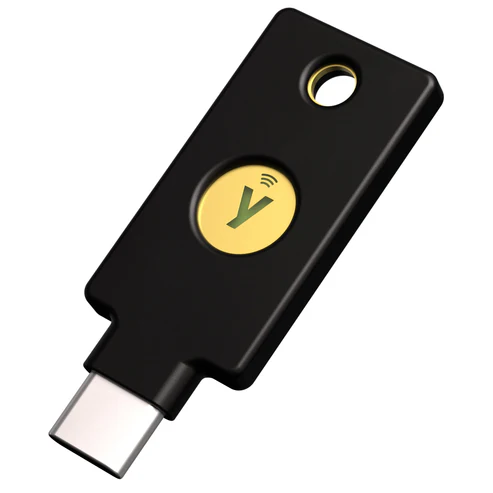
- Pick up the YubiKey 5C NFC on batten.shop – it works with USB-C and NFC for iPhone, Android, Mac, and Windows.
How YubiKey Security Works
Understanding why YubiKey is secure requires a quick look at what makes other 2FA methods exploitable.
When you log in with an SMS code or a Google Authenticator token, the server and your device share a secret. You type that secret into a form.
An attacker who controls a phishing page can capture that code and replay it on the real site within seconds. That’s not a theoretical attack – the Anti-Phishing Working Group recorded 3.8 million phishing attacks in 2024, and adversary-in-the-middle techniques that bypass TOTP codes are now widely documented.
YubiKey’s FIDO2 implementation breaks that attack model at the architecture level.
Public-Key Cryptography: The Foundation of YubiKey Security
When you register a YubiKey with a service, the key generates a unique cryptographic key pair for that specific website. The private key is created inside the hardware and never leaves it. The public key goes to the website. When you authenticate, the site sends a challenge, and the YubiKey signs it using the private key – proving possession without ever transmitting the secret itself.
No code is entered. No shared secret is transmitted. There’s nothing for an attacker to intercept.
Domain Binding: Why YubiKey Prevents Phishing
FIDO2 credentials are bound to the exact origin domain where they were registered. If you set up your YubiKey for google.com, that credential only responds to authentication requests from google.com. A phishing page at g00gle.com gets nothing – the key simply won’t authenticate on a domain it was never registered with. This is what Yubico identifies as phishing-resistant MFA, and it’s why no TOTP-based method can match it.

Physical Presence Requirement
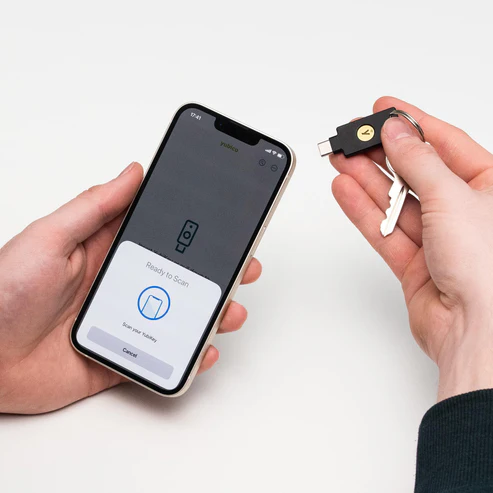
The YubiKey requires you to physically tap the key or press its button to authenticate. This prevents malware from silently using the key in the background. Even if your computer is compromised, an attacker can’t trigger a YubiKey authentication without you physically interacting with it.
Is YubiKey Safer Than SMS 2FA?
Yes – by a significant margin. SMS two-factor authentication has three well-documented attack vectors:
- SIM Swapping: Attackers convince your carrier to transfer your phone number to a SIM they control, intercepting all SMS codes.
- Interception: SS7 protocol vulnerabilities allow sophisticated attackers to intercept SMS messages in transit.
- Phishing: A fake login page can capture your SMS code and replay it on the real site before it expires.
YubiKey is immune to all three. No phone number is involved. No code is transmitted. And the domain binding makes phishing attacks structurally impossible with FIDO2 authentication.

The U.S. Office of Management and Budget’s Zero Trust strategy specifically lists FIDO2/WebAuthn and PIV smart cards as the only accepted forms of phishing-resistant MFA for federal agencies – explicitly excluding SMS and TOTP methods.
Is YubiKey Safer Than Google Authenticator and Other Authenticator Apps?
Authenticator apps like Google Authenticator, Authy, and Microsoft Authenticator are meaningfully better than SMS – but they share one fundamental weakness with SMS: they generate codes that users type into login forms, and those codes can be intercepted by phishing.
A study published in 2019 by Google, NYU, and UC San Diego found that hardware security keys blocked 100% of targeted phishing attacks, while authenticator apps and SMS codes still left users vulnerable to sophisticated targeted attacks.
Additional weaknesses specific to authenticator apps:
- TOTP codes can be captured by a compromised device (keyloggers, screen capture malware)
- Cloud-synced authenticator apps (including Google Authenticator’s sync feature) create a second attack surface
- TOTP secrets can potentially be extracted from phone backups
YubiKey eliminates all of these risks. The private key is generated in hardware, stored in hardware, and never exposed to the operating system.
YubiKey Security Comparison: Hardware vs. Software Authentication
| Authentication Method | Phishing Resistant | SIM Swap Resistant | Malware Resistant | Physical Presence Required |
| YubiKey (FIDO2) | ✅ Yes | ✅ Yes | ✅ Yes | ✅ Yes |
| Authenticator App (TOTP) | ❌ No | ✅ Yes | ⚠️ Partial | ❌ No |
| SMS Code | ❌ No | ❌ No | ⚠️ Partial | ❌ No |
| Password Only | ❌ No | ❌ No | ❌ No | ❌ No |
| YubiKey (OTP mode) | ⚠️ Partial | ✅ Yes | ✅ Yes | ✅ Yes |
Note: YubiKey’s OTP mode (Yubico OTP) offers weaker phishing protection than FIDO2. When a site only supports OTP authentication, a sophisticated phishing page could theoretically capture and replay the OTP. Always use FIDO2/WebAuthn when the service supports it for full phishing resistance.

Known YubiKey Vulnerabilities: What Actually Happened
YubiKey’s security record is strong, but it’s not perfect. Two advisories are worth knowing about.
The 2024 Infineon Side-Channel Vulnerability (YSA-2024-03)
In September 2024, security researchers at NinjaLab disclosed a side-channel vulnerability in the Infineon cryptographic library used in YubiKey 5 Series firmware prior to version 5.7.0. An attacker could theoretically clone a private key through electromagnetic measurement – but only with:
- Physical possession of the YubiKey
- Knowledge of the target accounts
- Specialized equipment costing $10,000–$32,000
- Significant technical expertise
Yubico rated the severity as moderate. Both Yubico and the researchers who discovered it explicitly stated that FIDO authentication remains the strongest phishing-resistant method available and strongly recommended continued use over SMS or OTP alternatives.
YubiKeys shipping after May 21, 2024 with firmware 5.7 or later are not affected – Yubico replaced Infineon’s library with their own. If you have an older key, the practical risk is near zero unless you’re a high-profile target with nation-state adversaries. Check your firmware version in the Yubico Authenticator app.
The 2024 FIDO2 Discoverable Credential Issue (YSA-2024-02)
A low-severity advisory disclosed that an attacker with physical access to your YubiKey could enumerate which services you’ve registered discoverable FIDO2 credentials with – without exposing the actual credentials or allowing account access. Yubico rated this low. The mitigation is straightforward: keep physical control of your key.
Bottom line on vulnerabilities: Both known issues require physical possession of your key. Neither allows remote exploitation. Comparing this attack surface to SMS or authenticator apps – where remote attacks succeed routinely – YubiKey remains categorically more secure.
What If I Lose My YubiKey?
This is the most practical risk for everyday users, and it deserves a direct answer.
Losing your YubiKey does not automatically give an attacker access to your accounts. A stolen or lost key without your PIN (if set), and without knowledge of your username and password, provides no access. The key alone is insufficient.
That said, the right response to a lost key is to deregister it immediately from all associated accounts. Most services that support hardware keys allow you to manage registered keys from your account security settings.
The best prevention is a backup key. Yubico recommends registering two keys with every account – a primary you carry and a backup stored securely at home. The YubiKey 5C NFC on batten.shop at $58 makes buying a second key a reasonable precaution rather than a luxury.
Additional backup options:
- Save backup codes when accounts offer them during setup
- Register a backup phone number or authenticator app as a lower-tier fallback on non-critical accounts
- Store backup recovery codes in a secure password manager
Can a YubiKey Be Hacked or Cloned?
The direct answer: not remotely, and not practically for nearly all users.
The theoretical attack from the 2024 NinjaLab disclosure involved stripping the physical casing from the key, probing the microchip with electromagnetic measurement equipment, and using that data to derive a private key through complex signal analysis. This is not a hack you perform over the internet. It’s an expensive, targeted, physical attack requiring specialized laboratory equipment and significant expertise.
For the vast majority of users – including people protecting banking accounts, email, crypto wallets, and business credentials – this attack vector is not a realistic concern. A thief who steals your YubiKey from your bag has not gained account access. They have a small USB device that requires your credentials and, on FIDO2 accounts, your PIN to function.
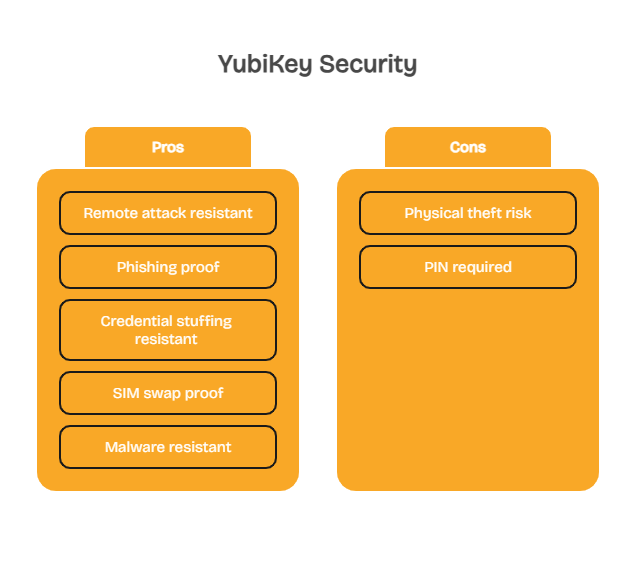
What YubiKey cannot be hacked via:
- Remote network attacks
- Phishing (FIDO2 mode)
- Credential stuffing
- SIM swapping
- Malware on a connected computer
- Brute force
YubiKey Security Protocols: What Each One Protects Against
The YubiKey 5 Series supports multiple authentication protocols, each with different security characteristics:
| Protocol | Phishing Resistant | Best Used For | Notes |
| FIDO2 / WebAuthn | ✅ Yes | Google, Microsoft, GitHub, most modern services | Strongest option – always prefer when available |
| FIDO U2F | ✅ Yes | Legacy services supporting U2F | Strong, same domain-binding as FIDO2 |
| PIV / Smart Card | ✅ Yes | Government, enterprise, high-security environments | Required by NIST AAL3 |
| Yubico OTP | ⚠️ Partial | Bitwarden, services without FIDO2 | OTP can be phished; still far better than SMS |
| OpenPGP | ✅ Yes | Email signing, git commit signing | For technical users |
| OATH-TOTP | ⚠️ Partial | Services requiring 6-digit codes | Acts like an authenticator app, less phishing-resistant |
Who Should Use a YubiKey?
YubiKey is the right tool for anyone who manages accounts where a breach would cause real harm. That’s a broader group than most people assume.
Best use cases for YubiKey:
- Remote workers and freelancers who access client systems, company VPNs, or cloud infrastructure from home networks without IT department protection.
- Anyone with a crypto wallet or exchange account – exchanges are high-value targets and FIDO2 support is growing.
- Google, Microsoft 365, and GitHub account holders – all three support FIDO2 and the YubiKey integrates seamlessly.
- People who travel frequently and use public Wi-Fi, where man-in-the-middle risks are elevated – pair it with advice from our secure Wi-Fi travel guide.
- Anyone who has experienced identity theft or account compromise – a hardware key addresses the root cause. See our guide to identity theft protection benefits for a broader strategy.
- Business owners and solopreneurs handling client data who lack dedicated IT support.
YubiKey is not overkill for personal use if you’re protecting accounts that matter. It is, however, primarily useful on services that support hardware key authentication. Before purchasing, verify that your most critical accounts – email, banking, password manager – support FIDO2 or U2F.

YubiKey Pros and Cons
Pros
- Complete phishing immunity with FIDO2: domain binding makes fake sites architecturally incapable of stealing your credentials
- No shared secrets transmitted: private keys are generated inside the hardware and never leave the device
- Multi-protocol support: works with FIDO2, U2F, PIV, OpenPGP, and OTP – one key covers legacy and modern services
- Physical presence requirement: malware cannot silently authenticate in the background
- Works offline: no battery, no mobile signal, no internet connection required
Cons
- Physical loss risk: losing your only YubiKey creates an account lockout situation without a backup
- Upfront cost: $55 for the YubiKey 5C NFC (two-key setup costs $110) versus free authenticator apps
- Not universally supported: some banks and financial services haven’t implemented hardware key support
- Setup complexity: registering the key with each service individually requires time and technical comfort

Backup Strategy: How to Use YubiKey Without Getting Locked Out
The most common concern about YubiKey isn’t security – it’s getting locked out. Here’s how to avoid it:
- Buy two keys from the start. Register both with every account during setup. Store the backup somewhere secure but accessible (a fireproof safe, a trusted family member’s home).
- Save recovery codes. Most services generate one-time recovery codes during 2FA setup. Save these in a password manager or print them and store them securely.
- Add a fallback method on lower-risk accounts. For accounts where hardware key support is available but stakes are lower, keeping an authenticator app as a secondary method provides a recovery path.
- Deregister immediately if a key is lost. Log in via backup method and remove the lost key’s registration before anyone else can find it.
Protect your most critical accounts with hardware-level security – get the YubiKey 5C NFC on batten.shop with USB-C and NFC support for all your devices.
Why YubiKey Is More Important Than Ever
Here are some sobering facts about identity theft and scams, ones that can cost you everything, ones that simple pieces of hardware like the YukiKey can prevent.
- Identity Theft Continued to Climb in 2025: By the end of the third quarter, 1,157,317 identity theft incidents had been reported, already surpassing the total number recorded in all of 2024.
- Credit Card Fraud Leads Identity Theft Categories: Among all reported identity theft cases during that period, credit card fraud accounted for the largest share.
- Identity Theft Risk by Age Group: Adults between 30 and 39 experience the highest rates of identity theft, while both younger and older age groups report significantly fewer incidents.
By using a tool like the YubiKey, you can help prevent yourself from becoming a part of one of these statistics.
Making the Right Authentication Choice for Your Accounts
YubiKey is the most secure consumer authentication method available. The data is clear: Google’s 85,000-person deployment produced zero account takeovers, Google’s joint research with NYU and UC San Diego confirmed zero targeted phishing successes against security key users, and Forrester’s Total Economic Impact study for Yubico found a 265% ROI and 99.99% reduction in breach risk for enterprise deployments.
For most users, the practical path forward is straightforward: buy two YubiKeys, register both with your highest-priority accounts – email, banking, password manager, crypto, work accounts – and store one as a backup. The $110 investment covers hardware that requires no subscription and has no expiration date.
For accounts that don’t yet support hardware keys, use an authenticator app rather than SMS. Both are better than passwords alone, but a hardware key eliminates the entire class of phishing attacks that software methods cannot.
Final Thoughts on YubiKey Safety
YubiKey represents a meaningful shift in how online accounts are protected. Instead of relying on codes that can be intercepted or shared secrets that can be stolen, it uses hardware-based public-key cryptography that fundamentally changes how authentication works. That architectural difference is why security keys have become the standard for phishing-resistant MFA in enterprises, government systems, and high-security environments.
For most users, the smartest approach is simple: protect your most important accounts with a hardware key, keep a backup registered, and use authenticator apps only where hardware keys are not yet supported. A small investment in hardware authentication can eliminate the most common account takeover attacks entirely.
Get the YubiKey 5C NFC on batten.shop – vetted by Batten’s security team, works across USB-C and NFC, compatible with 1,000+ services.
Frequently Asked Questions
Is YubiKey Safe for Everyday Personal Use?
Yes. YubiKey is safe, durable, and designed for daily use without technical expertise. Once registered with your accounts, authentication requires only a tap or button press. The primary consideration for everyday use is physical care – keep it on your keychain and register a backup key with your critical accounts.
Can Someone Clone a YubiKey If They Steal It?
Practically, no. The 2024 NinjaLab research demonstrated a theoretical cloning attack requiring physical possession, $10,000–$32,000 in specialized lab equipment, and significant expertise. For everyday users, a stolen YubiKey without your PIN and credentials provides no account access. Deregister it immediately and use your backup key.
Does YubiKey Prevent Phishing Attacks?
Yes, when used in FIDO2 or U2F mode. YubiKey credentials are cryptographically bound to the exact domain where they were registered. A phishing site on a different domain receives no valid response – the key simply won’t authenticate. This is why security researchers and the U.S. government identify FIDO2 hardware keys as the only fully phishing-resistant consumer authentication method.
Is YubiKey Safer Than SMS 2FA?
Yes, significantly. SMS codes can be captured through SIM swapping, SS7 interception, and phishing. YubiKey uses public-key cryptography with no shared secret transmitted, and its domain binding blocks phishing at the architectural level. Google’s research confirmed security keys blocked all targeted phishing attacks while SMS codes remained vulnerable.
What Happens If I Lose My YubiKey?
A lost YubiKey without your credentials and PIN cannot access your accounts. Log in using your backup key or recovery codes, then immediately deregister the lost key from all accounts through each service’s security settings. This is why registering two keys and saving recovery codes during initial setup is strongly recommended.
Does YubiKey Work with Google, Microsoft, and Banking Accounts?
YubiKey works with Google accounts, Microsoft 365, GitHub, Dropbox, Facebook, and hundreds of other services through FIDO2 and U2F. Bank support varies – many major banks haven’t implemented hardware key support yet, though adoption is growing. Use the Yubico Works With directory to check specific services before purchasing.
Is YubiKey Worth It for Non-Technical Users?
For anyone protecting a Google account, business email, password manager, or financial account, yes. Setup takes 10–15 minutes per service and requires no ongoing technical maintenance. The bigger question is whether the accounts you’re protecting support hardware keys – verify that first, then assess whether the $55 price point makes sense for your situation.
Sources
- “Google: Security Keys Neutralized Employee Phishing,” 2018, Krebs on Security, https://krebsonsecurity.com/2018/07/google-security-keys-neutralized-employee-phishing/
- “New Research: How Effective Is Basic Account Hygiene at Preventing Hijacking,” 2019, Google Security Blog, https://security.googleblog.com/2019/05/new-research-how-effective-is-basic.html
- “Google Case Study,” 2019, FIDO Alliance, https://fidoalliance.org/google-case-study/
- “Security Advisory YSA-2024-03: Infineon Cryptographic Library Vulnerability,” 2024, Yubico, https://www.yubico.com/support/security-advisories/ysa-2024-03/
- “Security Advisory YSA-2024-02: FIDO2 Discoverable Credential Issue,” 2024, Yubico, https://www.yubico.com/support/security-advisories/ysa-2024-02/
- “Phishing-Resistant MFA,” 2025, Yubico, https://www.yubico.com/resources/glossary/phishing-resistant-mfa/
- “Phishing Statistics 2025–2026: APWG Trends and AI Threats,” 2025, CaptainDNS, https://www.captaindns.com/en/blog/phishing-trends-2025-2026-statistics
- “The 265% ROI of Phishing Resistance with Yubico,” 2025, Yubico, https://www.yubico.com/blog/the-265-roi-of-phishing-resistance-with-yubico-why-modern-enterprises-are-ditching-legacy-mfa-for-yubikeys/
- “YubiKey vs. FIDO2 Security Key: What’s the Difference?,” 2025, Rublon, https://rublon.com/blog/yubikey-vs-fido2-security-key/
- “A Security and Usability Analysis of Local Attacks Against FIDO2,” 2023, arXiv, https://arxiv.org/pdf/2308.02973
- “From TOTPs to Security Keys,” 2025, USENIX SOUPS, https://www.usenix.org/system/files/soups2025-lassak.pdf
- “Are Yubico YubiKeys Phishing-Resistant?,” 2024, Keytos, https://www.keytos.io/blog/passwordless/are-yubikeys-phishing-resistant.html
- Phishing Activity Trends Report. 2025. APWG. apwg_trends_report_q4_2025 v22
- Identity Theft and Credit Card Fraud Statistics for 2025. 2025. Motley Fool Money Identity Theft and Credit Card Fraud Statistics for 2025 | The Motley Fool