

Quick Answer: To check your digital footprint, Google your full name in quotes, audit your social media privacy settings, run your email through HaveIBeenPwned, and search people-finder sites like Whitepages and Spokeo to see what personal information is publicly available about you.
Your digital footprint is bigger than most people expect. It’s not just old social media posts – it includes your home address, phone number, relatives’ names, property records, browsing behavior, and shopping habits, much of it compiled by data broker companies you’ve never interacted with.
Data brokers collect this information from public records, loyalty programs, app permissions, and website tracking, then package and sell it to marketers, background check services, and anyone willing to pay. The result: detailed personal profiles accessible to strangers, scammers, and identity thieves without your knowledge or consent.
Auditing what’s out there takes less than an hour. Here’s how to do it step by step.
Table of Contents
- Key Takeaways
- Active vs. Passive Digital Footprint: What’s the Difference?
- How to Check Your Digital Footprint: A Step-by-Step Audit
- What Personal Information Is Online About You
- How to Delete Your Digital Footprint (And What to Realistically Expect)
- Tools That Protect Your Digital Footprint Going Forward
- Taking Control of Your Personal Data Online
- Frequently Asked Questions
- Sources
Key Takeaways
- Your digital footprint includes everything from Google search results and social media profiles to data broker records and dark web breach exposure.
- Checking your digital footprint takes under 30 minutes using free tools including Google search, HaveIBeenPwned, and your Google account activity dashboard.
- Data brokers legally collect and sell your personal information – you must opt out of each site individually or use an automated removal service.
- A VPN, password manager, and identity protection service dramatically reduce ongoing personal data exposure.
- Browse Batten’s all-in-one digital security collection for expert-tested tools that monitor and reduce your digital footprint automatically.
Active vs. Passive Digital Footprint: What’s the Difference?
Understanding the two types of digital footprint tells you where your exposure is coming from – and which type is harder to control.
Your active footprint is data you knowingly share: social media posts, online purchases, account sign-ups, form submissions, and app logins. You created this data intentionally, which means you can often trace it, delete it, or limit it going forward.
Your passive footprint is data collected without your direct input. Every website you visit logs your IP address. Advertisers track your behavior across sites through cookies and tracking pixels. Mobile apps record your location even when you’re not actively using them. Data brokers aggregate all of this into profiles that are remarkably detailed.
Most people focus on cleaning up their active footprint – the old photos, the embarrassing forum posts – while their passive footprint quietly grows in the background. Both matter for your digital privacy and security.

How to Check Your Digital Footprint: A Step-by-Step Audit
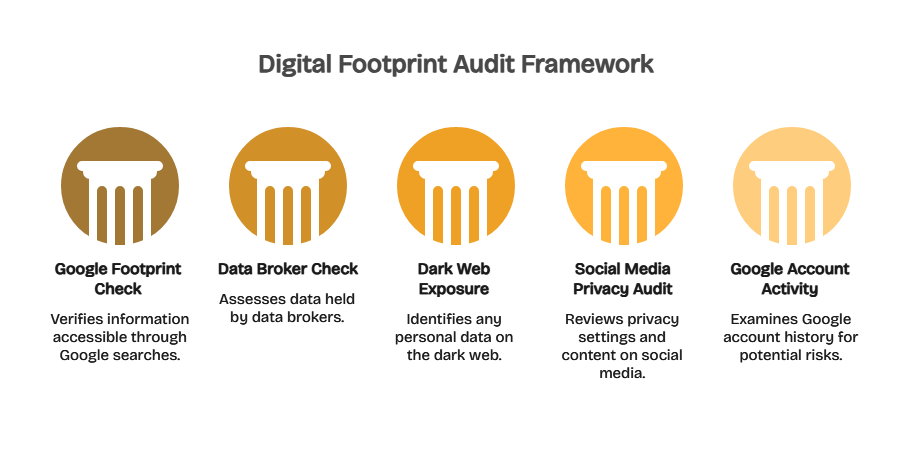
Running a digital footprint audit helps you see exactly what information is publicly accessible and where your privacy may be at risk.
Step 1: Run a Google Footprint Check
The simplest digital footprint scan starts with searching yourself.
- Search “First Last” (your full name in quotes) on Google, Bing, and DuckDuckGo
- Search your name combined with your city, employer, and phone number
- Try your email address and any usernames you use across platforms
- Use Google Images to check whether photos of you are indexed
Review the first three pages of results. Note any data broker listings, outdated profiles, or information you didn’t knowingly make public. This gives you your baseline.
Google also offers a Results About You tool at myaccount.google.com that alerts you when your contact information appears in search results and lets you request removal directly.
Step 2: Check What Data Brokers Have on You
People-search sites like Whitepages, Spokeo, BeenVerified, Intelius, and MyLife are the most common places your personal information surfaces publicly. Search your name on each and document what appears. You’ll often find current and past addresses, phone numbers, relatives’ names, estimated income, and property ownership – all visible to anyone.
For a faster audit across hundreds of broker sites, Cloaked’s Digital Footprint Eraser automatically identifies where your personal information appears and submits opt-out requests on your behalf, handling the process that would otherwise take hours manually.

Step 3: Check for Dark Web Exposure
Billions of credentials from past data breaches circulate on the dark web. Check whether your email addresses have been compromised at HaveIBeenPwned – a free, well-established tool that cross-references your email against a database of known breaches.
For ongoing monitoring beyond the free check, Identity Guard Ultra scans dark web marketplaces and criminal forums for your Social Security number, bank account details, and personal information, alerting you immediately when anything surfaces.
Step 4: Run a Social Media Privacy Audit
Social media platforms are major contributors to your active digital footprint. Work through each platform you use and check the following:
- Who can see your posts, friends list, and tagged photos?
- Is your birth date, phone number, or employer visible to the public?
- Are old check-ins or posts revealing your home address or daily patterns?
- Do third-party apps connected to your account still need access?
The Electronic Frontier Foundation’s Surveillance Self-Defense guide covers platform-specific privacy settings for major social networks and is updated regularly as platforms change their privacy controls.
Step 5: Review Your Google Account Activity
Your Google account logs your search history, YouTube watch history, location timeline, and app activity. Visit myactivity.google.com to review what Google has collected and delete categories you’re not comfortable with. You can also pause future collection of location history and search history from the same dashboard.
What Personal Information Is Online About You
The table below shows the most common types of data that appear in digital footprint audits and how they get there.
| Data Type | Common Sources | Risk Level |
| Name, Address, Phone | Data brokers, public records | High |
| Email & Login Credentials | Data breaches, phishing | Critical |
| Financial History | Credit bureaus, court records | High |
| Location Data | Apps, social media, Google | Medium |
| Browsing Behavior | Cookies, ISP tracking | Medium |
| Social Media Activity | Platforms, scrapers | Medium |
| Photos & Videos | Social media, image search | Medium |
| Relatives & Associates | People-search sites | High |
The combination of these data types creates profiles that identity thieves and scammers exploit to open fraudulent accounts, file fake tax returns, or conduct targeted phishing attacks. The more of this data that’s publicly accessible, the easier you become to impersonate.
How to Delete Your Digital Footprint (And What to Realistically Expect)
Complete erasure isn’t possible. But meaningful reduction is – and it makes a real difference in your exposure to identity theft, spam, and targeted scams.
Remove Personal Information from Data Brokers
Each people-search site runs its own separate opt-out process. Whitepages, Spokeo, BeenVerified, and dozens of others each require individual removal requests, and many re-collect data from public sources within months of removal. With over 200 active data broker sites, manual opt-out is a significant ongoing time commitment.
Cloaked’s Digital Footprint Eraser automates opt-out submissions across major brokers and monitors for data reappearance, handling the maintenance that makes manual removal unsustainable over time.
Request Google Search Result Removal
Google’s Results About You tool allows removal requests for contact information, explicit images, doxxing content, and certain personal records. Access it through your Google account at myaccount.google.com. Approval isn’t guaranteed, but Google removes qualifying content within a few weeks.
Delete Unused Online Accounts
Old accounts on defunct forums, shopping sites, and social platforms hold personal data that surfaces in breaches. The site JustDeleteMe rates how difficult it is to delete accounts across hundreds of services and links directly to their deletion pages. Start with accounts that hold payment information or your home address.

Reduce Ongoing Passive Data Collection
A VPN prevents websites, advertisers, and your internet provider from tracking your browsing behavior by encrypting your traffic and masking your IP address. NordVPN and ExpressVPN are both reliable options with independently audited no-logs policies – meaning they don’t retain records of your activity.

Tools That Protect Your Digital Footprint Going Forward
A one-time audit addresses your existing exposure. These tools handle the ongoing work.
| Tool | Primary Function | Best For |
| Aura All-in-One | Identity monitoring + VPN + antivirus | Complete ongoing protection |
| Bitdefender Premium Security | Security suite + identity protection | Families and home offices |
| Identity Guard Ultra | Dark web + financial monitoring | Identity theft prevention |
| Cloaked Footprint Eraser | Data broker removal automation | Reducing existing exposure |
| NordVPN | Traffic encryption + IP masking | Preventing passive data collection |
Aura’s all-in-one platform combines identity monitoring, dark web scanning, VPN, antivirus, and credit monitoring in a single subscription – a strong option for anyone who wants comprehensive coverage without managing multiple separate tools.
For related reading, see our guides on removing personal data from the internet, identity theft protection benefits, how common identity theft actually is, and dark web dangers explained.
Taking Control of Your Personal Data Online
Your digital footprint is larger than you think – but it’s controllable. Start with the five-step audit: search yourself on Google, check people-finder sites, scan for dark web exposure, review your social media privacy settings, and audit your Google account activity. Document what you find before you start removing anything.
For ongoing protection, pair a data broker removal tool with identity monitoring and a VPN. That combination covers the three main exposure vectors: existing data that’s already out there, new breach exposure as it happens, and future passive data collection from everyday browsing.
Ready to take control of your personal data? Explore Batten’s digital security collection for identity protection, data broker removal, and VPN tools recommended by our cybersecurity team.
Frequently Asked Questions
What Is a Digital Footprint and What Does It Include?
A digital footprint is the data trail you leave across the internet through browsing, app use, social media activity, purchases, and public records. It covers everything from your name and address to login credentials, location history, and behavioral data collected by advertisers – both information you’ve shared deliberately and data gathered without your knowledge.
Can People See My Digital Footprint Without My Knowledge?
Yes. Anyone can search your name on people-search sites like Whitepages or Spokeo and access your address, phone number, and relatives’ names for a small fee. Data brokers sell this information legally and without notifying you. Employers, landlords, scammers, and strangers all use these services regularly.
How Do I Check My Google Footprint for Free?
Search your full name in quotes on Google, then use Google’s Results About You tool at myaccount.google.com to see personal contact information appearing in search results and submit removal requests. Also visit myactivity.google.com to review what your Google account has recorded about your browsing, location, and search history.
How Do I Remove My Personal Information from Data Broker Sites?
Each data broker requires a separate opt-out request through its own removal process. Major sites include Whitepages, Spokeo, BeenVerified, Intelius, and MyLife. Data frequently reappears after removal as brokers re-collect from public sources. Automated services like Cloaked’s Digital Footprint Eraser manage opt-outs and re-submission across hundreds of sites on an ongoing basis.
How Does Your Digital Footprint Affect Identity Theft Risk?
A large digital footprint gives identity thieves more material to work with. Exposed addresses, phone numbers, email credentials, and financial records enable account takeover, synthetic identity fraud, and targeted phishing. The more personal data that’s publicly accessible, the easier it is for criminals to impersonate you or manipulate you with convincing social engineering.
What Is the Best Digital Footprint Checker Tool?
Start free with HaveIBeenPwned for breach exposure and Google’s Results About You for search visibility. For continuous paid monitoring, Aura and Identity Guard Ultra provide dark web scanning, data broker monitoring, and real-time alerts when your personal information surfaces online.
Does a VPN Reduce My Digital Footprint?
A VPN encrypts your internet traffic and masks your IP address, preventing websites, advertisers, and your ISP from tracking your browsing behavior. It meaningfully reduces your passive digital footprint but does not remove existing data from broker databases. Use a VPN like NordVPN alongside a data removal service for broader coverage.
Sources
- “Have I Been Pwned,” Troy Hunt, haveibeenpwned.com – free breach checking tool cited in Step 3
- “Surveillance Self-Defense,” Electronic Frontier Foundation, ssd.eff.org – social media privacy guidance cited in Step 4
- “Results About You,” Google, myaccount.google.com – Google’s own tool for monitoring personal info in search results, cited in Steps 1 and 5
- “My Google Activity,” Google, myactivity.google.com – Google’s account activity dashboard cited in Step 5
- “JustDeleteMe,” Robb Lewis, justdeleteme.xyz – account deletion difficulty ratings cited in the removal section
- “Data Brokers: A Call for Transparency and Accountability,” Federal Trade Commission, ftc.gov/reports/data-brokers – FTC’s foundational report on the data broker industry